Ramit Sethi’s "Conscious Spending Plan" and MyFinancials
Here's how you can track Ramit Sethi's four major buckets of where your money should go within MyFinancials. You'll be amazed at how easy it is!
Ramit Sethi is the author of "I Will Teach You To Be Rich" and the host of Netflix's "How To Get Rich". He's influenced millions to think about and manage their personal finances differently. If you're one of them, then you are already aware of his "Conscious Spending Plan" and his four major buckets of where your money should go. This blog post will simply show you how easy it is to use MyFinancials to track those buckets.
Please note, we are in no way affiliated with Mr. Ramit Sethi. We simply know that you might be and want to help you see how to use MyFinancials to track your finances with his philosophy. If you're not familiar with him, he's got a website, a YouTube channel, and several books out on the topic. Here's a video where he describes his plan himself:
Please note, we are in no way affiliated with Ramit Sethi. We simply know that you might be and want to help you see how to track your finances with his buckets.
Use Category Groups
MyFinancials has a "Category Groups" feature to group your income and expense categories which is the ticket to tracking Ramit's buckets.
Step 1: Setup a "Fixed Costs" Bucket
The "Concious Spending Plan" indicates you should have a bucket for "Fixed Costs" which are essentially your bills, groceries, etc. So first create a category group named "Fixed Costs." After creating that category group, you will need to then edit your "Categories" and assign which categories belong to that category group. For example, your "mobile phone", "groceries", and the other categories you use for recurring transactions are likely candidates for the "Fixed Costs" category group.
Step 2: Setup a "Guilt Free Spending" Bucket (aka "Fun Money")
The plan indicates you should also have a bucket for "Guilt Free Spending." This group should include all the other expense categories you setup. Simply repeate the process you used in Step 1 for these categories, but assign them to the "Guilt Free Spending" category group. The plan says you can spend on these guilt free, so you may want to use that as the litmus test for your selection.
Step 3: Use Insights!
The plan includes two other category groups, namely, Investments and Savings. Both of these are already reserved category groups within the application! So there's no need to set them up.
The "Investments" category group is automatically tracked in MyFinancials and includes all of your investment transactions that are not already categorized as income (e.g. Dividend Income, LTCG, etc.) or expenses (e.g. margin interest expenses). The good news is that you don't have to worry about these categories, we've set them up for you in the app. As you enter investment transactions they will be tracked.
The "Savings" category group is also automatically tracked. It includes any transfers you do into a "Savings" account type which includes Savings, CD, and Money Market accounts.
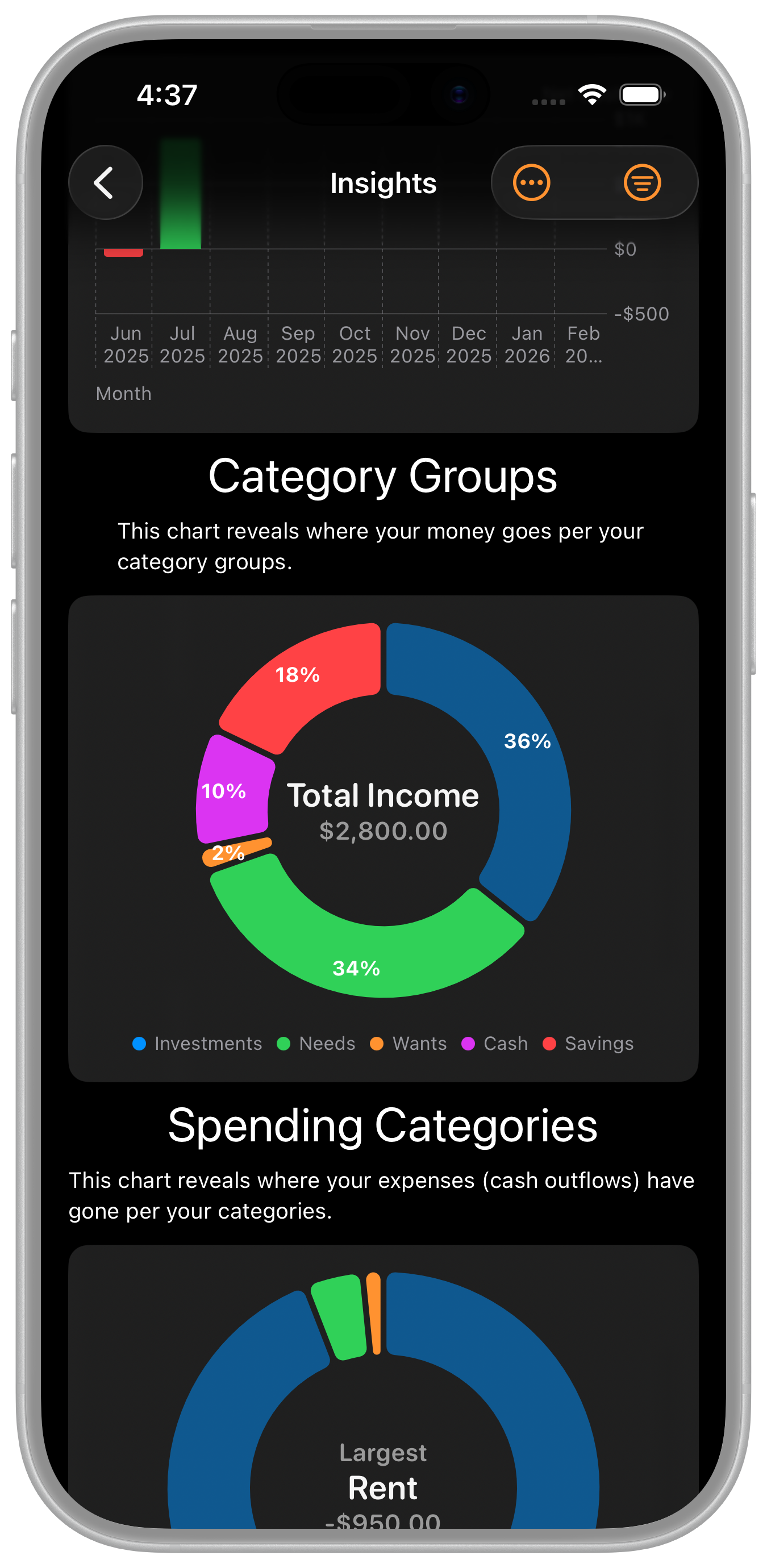
So now, all you have to do is view Insights in the app and you will see a "Category Groups" chart that shows your category groups which map to the "Conscious Spending Plan" across the report filters you select in the app!
A Note About Percentages
Please note, the percentages shown on the Category Groups chart (after version 1.0.2) are the percentages Ramit discusses as long as you track your payroll taxes as separate expense categories. Ramit gives you percentage goals as to how much each bucket should be of your "take home salary".